Categories
3. Content publishing for tablets 5. Succesfull digital publication 6. Marketing & digital publications

The Reader design according to publisher’s configuration

Triobo allows publishers to define customized reader appearance on tablets and smartphones. This new feature allows to attract readers and advertisers effectively.

Let me first recall that all reader devices created in any price tariff of Triobo digital publishing are published strictly under the brand and name of the client, with his icon and initial screen.

Exclusive look and new business opportunities

What can be arranged by publisher who is using the Triobo Professional or higher tariff?

  • Wallpaper background – static and dynamic(!). The publisher creates the entire wallpaper directly in Triobo editor, thanks to that the wallpaper can be animated, with interactive features, may even include video, as you will see at the end of this article. The background of the reader is created as any regular page of interactive digital publication. Besides that the publisher determines at what place the overview with issues of digital publications will be displayed (in transparent layer placed over a wallpaper).
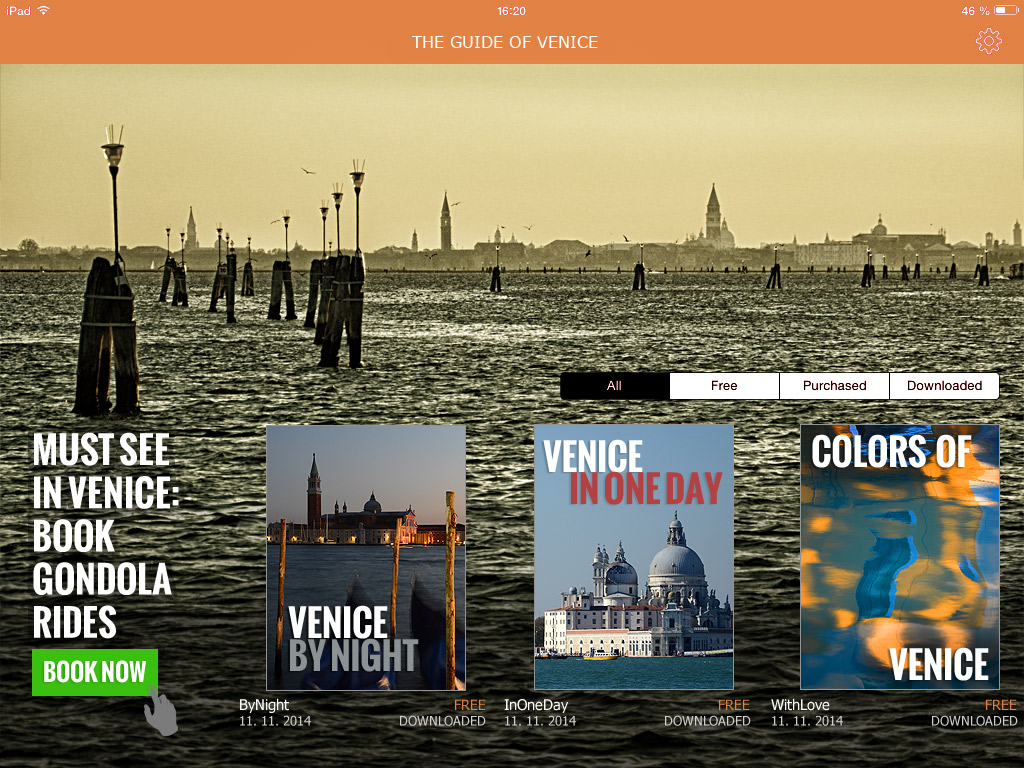
  • Internal or commercial advertising. The previous paragraph implies that the reader background may include any advertisement, again with animations, interactive elements, videos and so on. In the example of Venice Guide (see below), note that the ad may include the click through button to the advertiser’s website.
  • Colors used in the reader. All standard reader features, such as. the upper bar, bookmarks with issue selector, dialog with issue detail that appears when you click on the envelope – all that may be colored according to the publisher’s desire.

And that’s not all:

  • The publisher may create different wallpaper versions for tablet landscape orientation and another one for portrait version (different layout and graphic content may be created).
  • You may have reader with separate wallpapers for tablets and mobiles.
  • The publisher may display a different reader wallpaper for Apple iOS platform layout and another one for Android platform.
  • The reader design can be remotely updated.

How this can look like?

At the Venice Guide example you see the reader with own wallpaper (photo), where a commercial advertising was placed (order for gondola ride). The overview of issues – in our example three separate Guide issues – was positioned so that it aesthetically complements the picture. The entire reader was additionally colored in harmony with photos.
Ukázka vydavatelem definovaného vzhledu čtečky Triobo

How to attract readers? With video-wallpaper!

Categories
3. Publikování obsahu pro tablety 5. Úspěšná digitální publikace 6. Marketing digitální publikace

Čtečka s designem dle přání vydavatele

Triobo umožňuje vydavateli definovat vlastní vzhled čtečky pro tablety a chytré telefony. Díky tomu lze efektně zaujmout čtenáře i inzerenty.

Připomeňme nejprve, že všechny čtečky vytvořené v jakémkoli cenovém programu digitálního publikování Triobo jsou zveřejněny striktně pod značkou a jménem klienta, s ikonou klienta a s jeho spouštěcími obrazovkami.

Exkluzivní vzhled i nové obchodní možnosti

Co může navíc nastavit vydavatel využívající tarif Triobo Professional nebo vyšší?

  • Tapetu na pozadí – statickou i dynamickou(!). Vydavatel celou tapetu tvoří přímo v editoru Triobo a díky tomu může být tapeta libovolně animovaná, s interaktivními prvky, dokonce může obsahovat i video, jak uvidíte na konci článku. Pozadí čtečky vytváříte stejně jako běžnou stránku digitální interaktivní publikace. Vydavatel navíc jen určí, na jakém místě se zobrazí (v průhledné vrstvě umístěné nad tapetou) přehled vydání digitální publikace.
  • Reklamu interní nebo komerční. Z předchozího bodu plyne, že pozadí čtečky může obsahovat jakoukoli inzerci, opět s animacemi, interaktivními prvky, videem a podobně. Na příkladu Průvodce Benátkami (viz níže) si všimněte, že reklama může obsahovat i proklik na webové stránky inzerenta.
  • Barvy používané ve čtečce. Všechny standardní prvky čtečky, jako např. horní lišta, záložky s filtrem vydání, dialog s detailem vydání, který se objeví při klepnutí na obálku – to všechno může vydavatel obarvit dle svého přání.

To není vše:

  • Vydavatel může vytvořit jinou verzi tapety čtečky pro orientaci tabletu na šířku a jinou verzi na výšku (bez problému může být jiné uspořádání grafiky i obsahu).
  • Lze vytvořit jinou tapetu čtečky pro tablety a jinou pro mobilní telefony.
  • Vydavatel digitální publikace může zobrazit jinou tapetu a jiné uspořádání čtečky pro platformy Apple iOS a jiný obsah na platformě Android.
  • Design čtečky lze u čtenářů na dálku průběžně aktualizovat.

Jak to může vypadat?

Na příkladu Průvodce Benátkami vidíte čtečku s vlastní tapetou (fotografie), do které byla umístěna komerční reklama (objednávka projížďky na gondole). Přehled vydání – v našem příkladě celkem tři vydání průvodců – byl umístěn tak, aby esteticky doplňoval fotku. Celá čtečka byla navíc obarvena v souladu s fotografií.

Ukázka vydavatelem definovaného vzhledu čtečky Triobo

Jak zaujmout čtenáře? Videopozadím!