Categories
3. Content publishing for tablets 7. Vocabulary

Triobo Kiosk – more magazines in one application

Triobo Kiosk – a set of digital publications in one single application categorized into folders, may be useful to publishers with a large number of digital magazines.

When you for example create a series of tourist guidebooks or other closely related publications and it is sufficient that all publications in your app are “side by side” (not in separate folders), then read more about Triobo publishing portal and differences between Kiosk and portal.

As mentioned before, Triobo Kiosk is especially designed for digital magazines. After starting the application readers see a list of titles, each of them displayed with most current cover. Then when a specific title is tapped on the reader gets to a deeper level, where individual magazine issues may be seen.
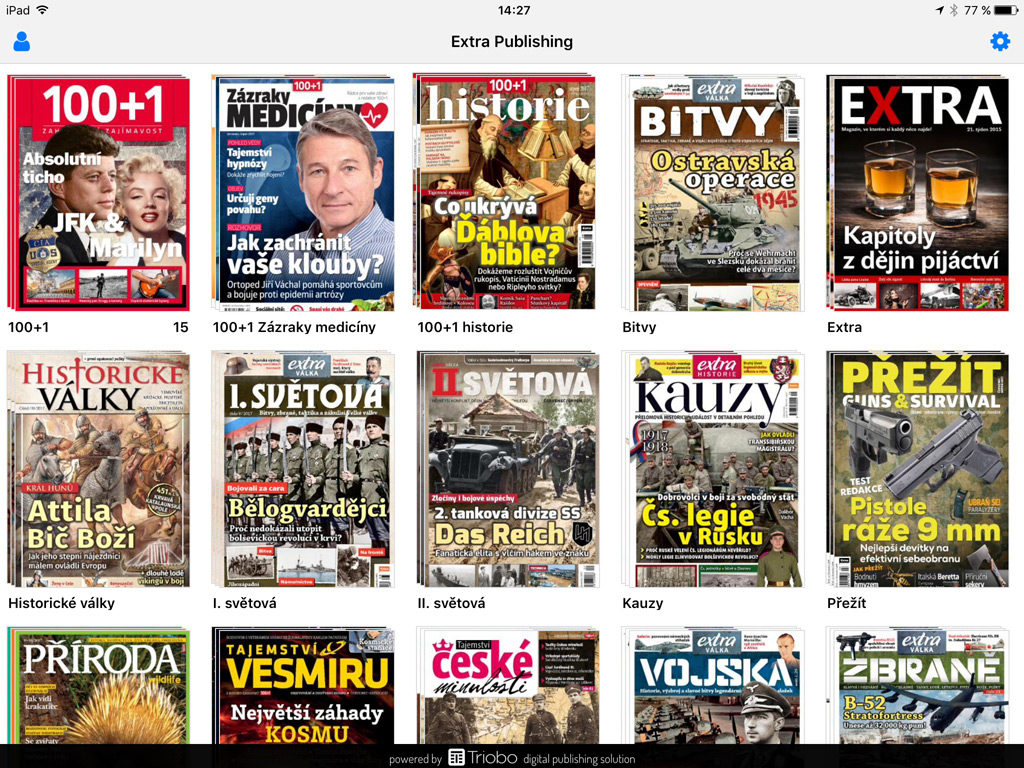
Triobo Kiosk

It is obvious that the icon with and application name of Triobo Kiosk is always made according to client specifications – readers only see publishers identity and brand name in App Store / Google Play.

Kiosk advantages? Easier marketing for publishers, promotion of just one application instead of six separate magazines. Also, imagine such situation where you have a very successful magazine and you want to start a brand new one. When you add a new magazine to Triobo Kiosk next to other successful title, all your readers will automatically learn about it because they have it already pre-installed in their tablets and smartphones.

Tip: publishers who use Triobo Kiosk, may have their titles placed in own Triobo Kiosk and also at the same time separately in App Store / Google Play – at very favorable price. The benefits then remain in both situations, for publisher a simple marketing and also easy to find title for new readers, who will only know the name of a particular magazine.

Triobo Kiosk supports all popular features of Triobo:

Categories
3. Content publishing for tablets 7. Vocabulary

The difference between publishing portal and Triobo Kiosk

Publishing portal may contain digital titles only on one level (“Side by Side”), without any further segmentation. From the perspective of Triobo editor all individual issues are included in one digital publications. A typical example is a set of guidebooks for certain location. More information.

Triobo Kiosk contains a set of full-featured digital publications (typically digital magazines), categorized into separate folders. Each publication has unlimited number issues. It uses similar regime for digital publications as Apple Newsstand on Apple tablets. From perspective of Triobo Editor it is a set of independent publications in one Reader.

Categories
6. Marketing & digital publications 7. Vocabulary

Automatic cover page update in AppStore

Triobo allows automatic updating of tablet magazine cover pages in Appstore. This concerns digital magazines located in the Kiosk (Newsstand). Triobo have changed the usual practice where publishers placed cover pages of new issues manually, through web iTunesConnect.

Triobo digital publishing can provide so-called. AtomFeed that Apple is able to process automatically; you will save time and worries with cover page updating. This option is available to all customers with Triobo Professional tariff or higher.

Ukázka obálky v iTunes

How to do it?

First of all you need to publish any issue to public Apple iOS reader – you may re-publish any current issue. In this case, do not forget to mark the Rebuild option because you need to create a title page preview in different size (as big as Apple requires).

You will also need to find out where is located your AtomFeed: in the list of publications press the [i] icon (publication properties).

Publication properties

On the right side the reader applications are displayed. For the Apple iOS reader click Properties.

Reader properties

At the bottom you will find the URL, copy it (it looks as follows: http://storage.triobo.com/appleatomfeeds/87-s87x230.xml)

AtomFeed Triobo

If you have any newly published issue (not earlier, because until you publish at least one issue, then there is no AtomFeed in existence), go to the Apple iTunesConnect. In your application, select Newsstand from the top menu.

Click the Add Atom Feed. Enter the URL and nothing else. Save. System check will occur. If everything is OK, the Apple will message you that cover pages will be downloaded once a day (so it will show in App Store tomorrow).

The publication date will be sent to Apple (exactly as you have set it up), and the issue description is being sent out as well – it is a compulsory item with at least 10 characters (many of you do not have this filled up in Triobo editor). Attention, without filling up the issue description our AtomFeed will not be accepted by Apple!

Issue description