Categories
2. Triobo editor 6. Marketing & digital publications 7. Vocabulary

Advanced communication with readers – Triobo Push Notification Assistant (Triobo PNA)

A Unique Triobo Push Notification Assistant (Triobo PNA) is a powerful marketing tool for publishers of tablet publications. Triobo PNA significantly broadens the basic range of services that are sending messages to readers (so called. Push notifications, more here) that are displayed on their tablets or smartphones.

Thanks to the Triobo Push Notification Assistant that publisher can conveniently communicate and reach out specific groups of readers. The publisher then may send a message to:

  • All of his readers
  • Readers, didn’t download the latest issue of tablet magazine
  • Readers, that have not ordered a subscription yet
  • Readers, that their subscription has expired and was not renewed
  • Readers, who’s subscription expires during N days
  • Readers, who have not opened any magazine of a publisher at least N days

The publisher can also send a different message to readers on Apple tablets/phones and different message to other Android users. If the publisher has active multiple language versions, then he can also specify reading groups by language.
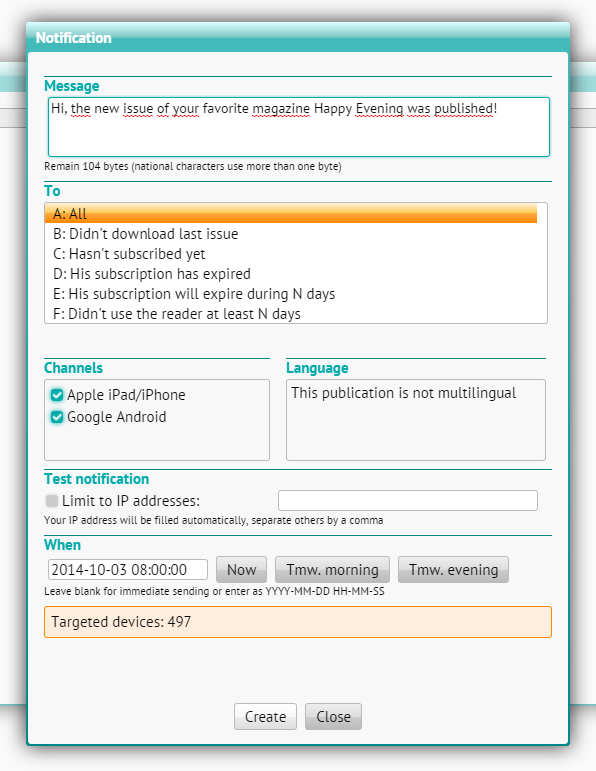
Triobo push notifications - advanced assistant

Using the function for notification testing, the publisher can send a test message (note: the reader should not have currently opened your magazine and also he must have enabled push notifications for your magazine – otherwise the message will not be delivered).

The publisher keeps always track about the number of readers whom the message will be sent – in any parameter settings for sending of push notifications, the dialog box at the bottom will recalculate the number of target devices (tablets and phones).

In addition the publisher can schedule sending of push notifications to a specific date and time. In such case, the message is queued for dispatch and will be sent out at specified time.

Triobo Push Notification Assistant is accessible to publishers with the Triobo Professional tariff or higher.
Categories
2. Triobo editor

Push notification – sending messages to readers

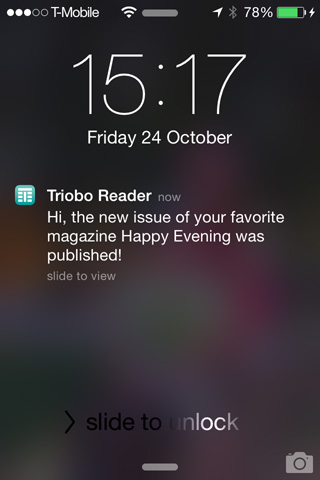
Thanks Triobo digital publishing you can send messages to your readers, called push notification. This service is intended for the notification about the newly published issues (Triobo Start pricing program), but can also be used to distribute any other information that are consistent with the rules of Apple or Google (Triobo Professional pricing program).

Push notification sample

For sending notification see the publications settings, ie where you initially adjusted the fonts. Go to the publications list and click the icon . At the upper part the information will appear disclosing how many devices were registered on the iOS platform and the Android platform:

Informace o počtu registrovaných zařízení

Click on Arrange notification and create notification:

Nastavení push notifikace

Enter the text that will be contained within the message. The message can be up to 170 bytes, but national characters occupy most two bytes, some special characters and more. Information on the number of bytes remaining is shown during message writing within the text field.

If you check the item Set icon badge …, then the information will be sent out informing that new edition was published (only for Apple iOS platform). Above the application envelope a blue ribbon will be displayed to the readers notifying them that new edition was published (if your application is not part of the Kiosk, then over the application icon a red circle with the number 1) will appear.

Checking the box Send only to readers who … ensures that the message will be sent out only to those readers who have not yet downloaded the latest editition.

You can choose whether the report will be distributed to all platforms for which you have a reader, or you can check only some of them.

After pressing Send notification information about successful distribution will be displayed.

Note: Number of registered devices is changing over time: increasing with each new installation, where the reader is allowed to send messages. But it can also decrease in a situation where Apple recognizes at the message sending, that your application has been uninstalled from the device.